20260507 - Self-Service: Billing Options Available for New Business - Public
Personal Lines Bulletin


PolicyCenter® now provides agents more flexibility when assisting customers with payments on new business submissions for Personal Lines policies.
PolicyCenter Billing Method Changes Now Available for Agents
If a policy was originally set to Mortgagee Bill, the agent can now change the Billing Method to Direct Bill directly on the issuance transaction and then select the appropriate payment plan from the Payment Schedule.
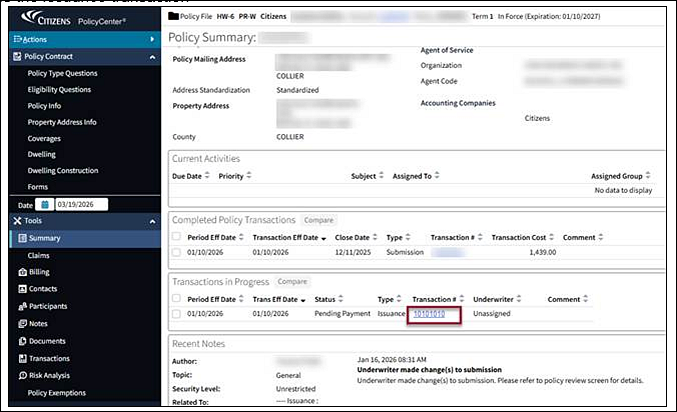
Figure 1: Access the issuance transaction located on the Policy Summary screen.
Once the Billing Method is updated, the Payment Plan can be changed to quarterly or semi-annual. The policyholder will be able to make their payment by selecting the One-Time Payment option online.
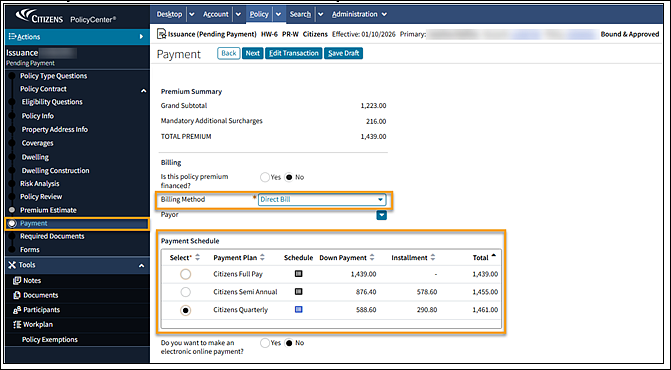
Figure 2: Select the appropriate payment plan located on the Payment screen.
One-Time Payment Option for Mortgagee-Billed Submissions
As a reminder, when a new business submission is set to Mortgagee Bill and Full-Pay, the Named Insured can now submit the full premium amount for payment electronically through the One-Time Payment page located on the Public website.
Notes:
- Agents will need to provide the policy number to the policyholder to enable them to submit the payment through the website.
- Partial payments are not permitted for this payment method.
- While the payment plan can be selected if on Direct Bill, the down payment is still required.
This enhancement gives customers more control and can help prevent delays in issuing coverage, especially when the mortgage company will not be sending payment at the time of binding.
Resources
Log in to the Agents site and select Training on the top menu, then select Personal Job Aids; and look under Billing to access the Making an Online Payment option.