
20260701 - Automatic Roof Age Retrieval for New Business - Public
Personal Lines Bulletin


Beginning July 2, 2026, when an agent creates a new business application for a policy with an effective date on or after August 1, 2026, PolicyCenter® will be able to retrieve the year of last roof update automatically.
Roof age will automatically be displayed on applications when available. The year of last roof update will be provided by Virtual Roof/Verisk, our trusted third-party data vendor, and will enhance the submission process for new business.
This enhancement applies to submissions for the following policy types:
- Citizens Homeowners 3 – Special Form (CIT HO-3)
- Citizens Homeowners 8 – Modified Coverage Form (CIT HO-8)
- Dwelling Property 1 – Basic Form (CIT DP-1)
- Dwelling Property 3 – Special Form (CIT DP-3)
- Homeowners 2 – Wind-Only Form (HW-2)
- Dwelling Property 2 – Wind-Only Form (DW-2)
New PolicyCenter Fields
The Dwelling Construction screen will have two new data fields:
- Roofing Information Status
- Last Roofing User Action
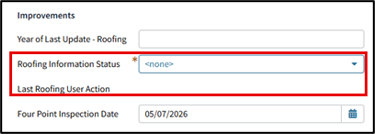
Figure 1: New field, Roofing Information Status, on the Dwelling Construction screen
Select Retrieve in the Roofing Information Status field.
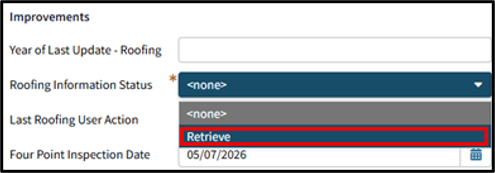
Figure 2: Data retrieval once roof information is entered
When this information is retrieved successfully, it will populate the following fields:
- Year of Last Update – Roofing with the year
- Roofing Information Status as Completed
- Last Roofing User Action as Accepted
Note: If there is no roof age available or no roof age is found, nothing will populate.
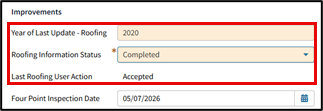
Figure 3: Retrieval information results
If the Year of Last Update – Roofing data field is changed after the retrieval process, the system will change the Last Roofing User Action to Overridden.
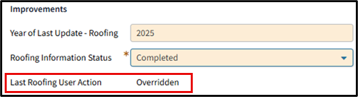
Figure 4: Updates made after retrieval selection results
Once the Year of Last Update is retrieved, the agent will need to verify that the date given is correct.
- If the agent agrees that the retrieved data reflects the most recent roof update, no proof of roof update is required.
- If the agent doesn’t agree that the retrieved data reflects the most recent roof update, the agent will need to input the correct year of last update in the Year of Last Update – Roofing field and provide documentation to support the change.
- This only applies when the value that is returned is changed. When a value is entered when no value was returned or a returned value is changed, you must provide proof of that update. Refer to FAQ 1161 for acceptable proof of roof documentation.
Note: All other underwriting requirements related to roof age and remaining useful life still apply.
Resources
For more information, agents and credentialed agency staff can log in to the Agents site to review the Underwriting guidelines and other resources to help you service your customers:
Select Personal > PR-M or PR-W and the appropriate policy type to access:
- Underwriting guidelines and review the Roof Age and Condition rule
- Required Document Guides, in the Spotlight section on the right side of the page
- Home Condition Requirements Guide
Select Training > Personal Job Aids to access:
You also can select FAQs on the website’s top menu and enter +roof +covering or +roof +age in the Search field.