Citizens' website, PolicyCenter® and ClaimCenter®, including electronic payments, will be unavailable due to maintenance on Wednesday, October 14, from 7 p.m. to 10:30 p.m. Report a loss by contacting our 24/7, Claims Reporting Center at 866.411.2742 during this time. We apologize for any inconvenience.

20260115 Loss History Retrieval Process Change - Public
If you have questions or concerns, please access the Accessibility page for further details.
Personal Lines Bulletin
Citizens Highlights


Loss History Retrieval Process Change
01.15.26
Starting January 15, 2026, Citizens will switch from A-Plus/Verisk to LexisNexis Comprehensive Loss Underwriting Exchange (C.L.U.E. Property) for reporting past loss history.
With the implementation of C.L.U.E. Property, changes to the flow of the new-business submission will become more streamlined, eliminating the need to toggle between screens to reconcile prior loss information with the Loss History Report. For details on how to process loss history retrieval using C.L.U.E. Property, you can refer to the Automated Loss History and Proof of Repair Guide linked in the Resources section below.
System Enhancements
To improve workflow, the Consent Question, Prior Losses, and Claims tabs will move from the Policy Info screen to the Risk Analysis screen and new tabs will be added for A-Plus Loss History and C.L.U.E. Loss History.
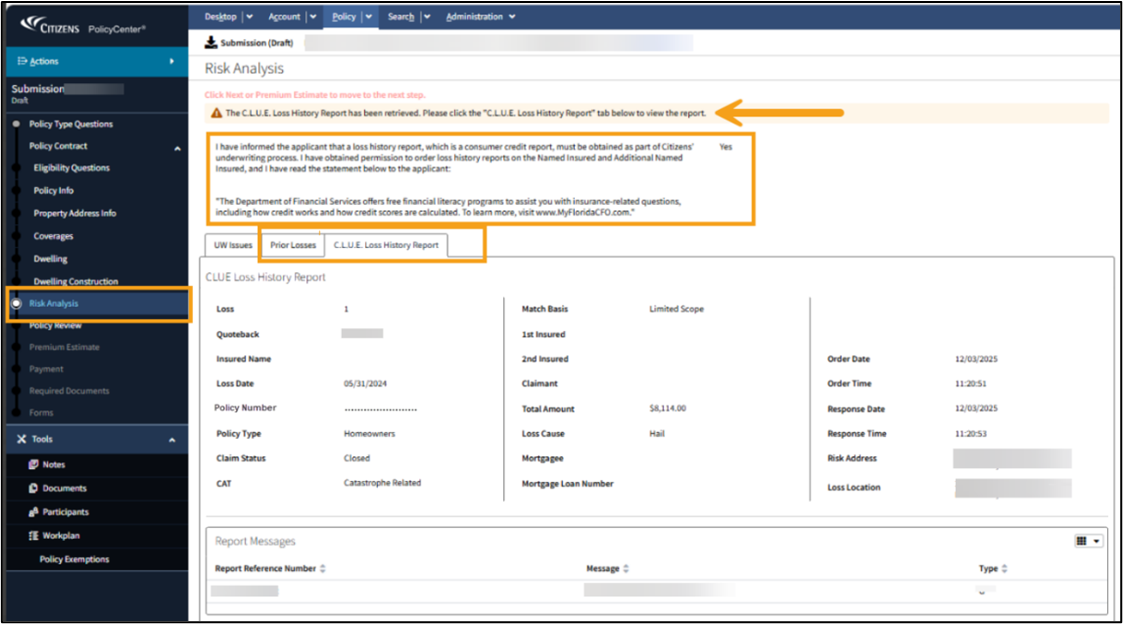 Figure 1: New tabs on the Risk Analysis screen
When the system successfully returns a C.L.U.E. Loss History Report, a system message will display to notify the user that the report is available for review. Returned losses will automatically be added to the Prior Losses tab.
Note: For existing policies created before implementation, or submissions created before implementation that remain in submission status, the A+ Loss History Report tab will be displayed.
 Figure 2: A+ Loss History Report tabs
Agents will still be required to review and reconcile the information in the Prior Losses tab to confirm all fields are applicable to the risk and add the description for the losses returned. If a loss is deleted from the Prior Losses tab, agents must select from the new Delete Reason dropdown prior to deleting the loss:
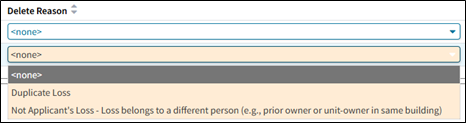 Figure 3: Delete Reason field
Note: If a loss is entered in error, select Duplicate Loss as the delete reason.
Transitioning to C.L.U.E. Property
The A+ Loss History Report tab will appear only for policies issued before C.L.U.E. Property implementation or for submissions created before implementation that remain in submission status.
For submissions that were not issued prior to implementation, the C.L.U.E. Property will be required when an agent or Underwriter makes a change to the following data fields on a bound or unbound submission:
| PolicyCenter® Screens | Data Fields |
|---|---|
| Policy Info |
|
| Property Address Info |
|
The system will redirect users to the Risk Analysis tab if a C.L.U.E. Loss History Report was not completed, and PolicyCenter will erase all the A-PLUS Loss History information.
 Figure 4: Error message
The agent will have to revalidate the consent question to order a Loss History Report. A C.L.U.E. Loss History Report will be generated, and the Prior Losses tab will need to be reviewed and edited, if necessary.
New Alert Messages and Policyholder Notices
Agents may encounter some new alert messages and policyholder notices as a result of the transition to C.L.U.E. Property.
- New alert messages will be detailed in the Automated Loss History and Proof of Repair Guide.
- Cancellation, declination, and nonrenewal customer notices will be revised to reflect new processes. The Fair Credit Reporting Act (FCRA) letters have been updated to reference LexisNexis and include report reference numbers.
Resources
For additional resources, log in to the Agents site and select Training > Personal Job Aids to access The Automated Loss History and Acceptable Proof of Repair Guide.
Node: ewmas04-prd:8080